
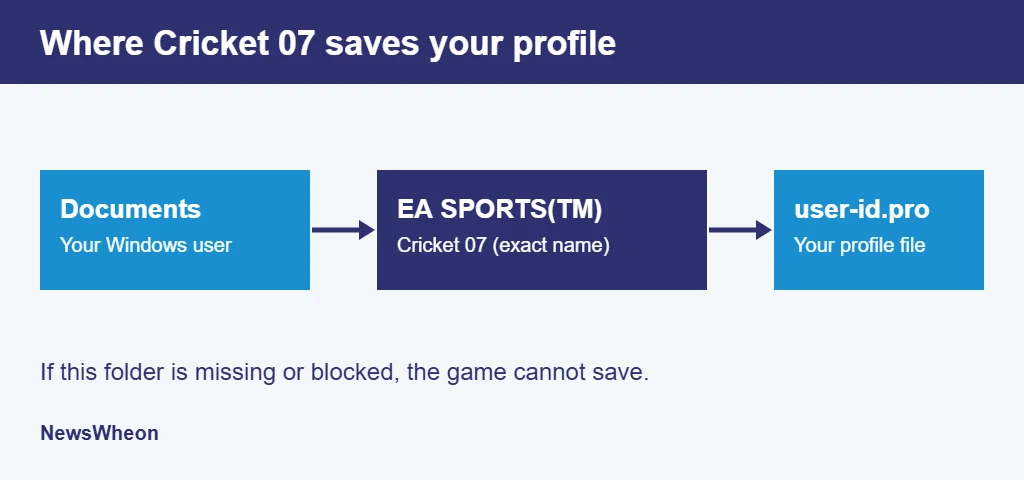
PCGamingWiki lists the Cricket 07 profile path as %USERPROFILE%\Documents\EA SPORTS(TM) Cricket 07\<user-id>.pro, and a missing or blocked folder there is the fix most often reported in player threads for the “Unable to save the profile/tournament” message. If you reinstalled Cricket 07 on Windows 10 or 11, set up a custom tournament and watched the save fail, this Cricket 07 save error guide is written for that moment. It lists eight fixes in order, starting with the folder check, and says plainly where we could not confirm the cause.
If the game will not start at all, our Cricket 07 errors fix guide is the better place to begin. For the full setup, see the Wheon Cricket 07 guide.
Why the Cricket 07 save error happens
The game writes your profile to a folder in your Windows Documents, not to its own install folder. The folder name must be exact, including the (TM). If it is missing, or Documents points somewhere the game does not expect, the game has nowhere to write the file and shows the Cricket 07 save error.
Reinstalling the game will not fix a folder problem.
An older Planet Cricket thread shows how this goes wrong. A player ran a registry cleaner, and every save after that returned “UNABLE TO SAVE PROFILE.” They reinstalled the game and deleted their profile file in the Cricket 07 documents folder, and the error stayed. One reply said to delete the folder or create a My Documents folder on the same drive as the install. That thread is years old, but it points the same way as the Supercheats and CricketWeb answers: the cause sits outside the install folder.
The folder is not the only cause of the Cricket 07 save error. A reader on the same Supercheats thread says they made the folder and still saw the error. The fixes below start with the folder, then move through permissions, security software and the game files.
Fixes to try, in order
Work through these Cricket 07 save error fixes in order. Close the game fully before each step, then start it again and try one save, and stop at the first fix that works.
- Check the Documents folder. Open Documents in your Windows user folder. If EA SPORTS(TM) Cricket 07 is missing, create it with that exact name, including the (TM), then start the game and try a save.
- Check where Documents really is. If OneDrive backup is on, Windows may point Documents at a OneDrive location. Right-click Documents in File Explorer, open Properties, read the Location tab, and create the folder there. We found no report that confirms OneDrive as a cause, but it is a quick check. An old CricketWeb thread also fixed the same error by creating a plain My Documents folder and moving the EA folder into it after the Documents folder had been renamed. If the folder exists in the right place and saving still fails, pausing OneDrive sync or turning off its Documents backup for a test may release a stubborn write lock. We found no report confirming that either, so treat it as a test.
- Run the game as administrator. Right-click the game’s .exe file, open Properties, go to the Compatibility tab and tick “Run this program as an administrator.” Click Apply, then launch it.
- Set compatibility mode. On the same tab, tick “Run this program in compatibility mode for.” A Cricket 07 community guide picks Windows 7 for Windows 8, 8.1 and 10, and Windows XP (Service Pack 3) for Windows 7. It does not cover Windows 11, so try Windows 7 first and then XP SP3.
- Check your antivirus and Windows Security. Open Windows Security, then Virus and threat protection, then Ransomware protection. If Controlled folder access is on, it can block an old game from writing files. Add the game as an allowed app.
- Check folder permissions. Make sure Read-only is not ticked on the game folder or on the EA SPORTS(TM) Cricket 07 folder, and that your Windows user has Modify and Write permission under the Security tab.
- Remove recent patches and test the base game. If the error began after you installed a patch, take it out and try a save. Our Cricket 07 IPL patch guide covers installing it safely.
- Reinstall from a clean copy, but only after the steps above. One Supercheats answer suggests reinstalling the game. If saving still fails on a fresh install, the copy of the game itself may be the problem, so try one from a source you trust.
Turning your antivirus off is not the fix. An exception for the game folder is. A site that tells you to disable security before downloading a Cricket 07 file is a reason to leave that site.
From our practice: what the threads agree on
Across the Supercheats, CricketWeb and Planet Cricket threads we read, the fix that keeps coming back is the Documents folder, even though the posts are years apart. We did not find OneDrive named in the excerpts we read, so we list it as a check, not a confirmed cause. We have not reproduced the Cricket 07 save error on our own PC and found no official EA fix. Tell us in the comments which step worked for you so we can move it up the list.
Cricket 07 save error questions from worried players
I created the EA SPORTS(TM) Cricket 07 folder in Documents and the game still says it cannot save my profile. What am I missing?
That is frustrating, and you are not alone: one Supercheats reader reports the same thing. The folder is not always the whole answer. Check the exact name, including the (TM), then try administrator mode, Windows 7 compatibility mode and the Controlled folder access setting in Windows Security.
I reinstalled Cricket 07 twice and the save error keeps coming back. Is my copy of the game broken?
Not necessarily. Reinstalling rarely helps, because the save folder sits in Documents, outside the install folder. An older Planet Cricket thread describes the same loop. Check the Documents folder and permissions first, and only then try a different copy of the game from a source you trust.
My Documents folder is synced with OneDrive and Cricket 07 cannot save. Could that be the reason?
It is a fair worry, though we found no report that confirms it. When OneDrive backs up Documents, Windows points that folder at a OneDrive location. Right-click Documents, open Properties, check Location, and create the EA SPORTS(TM) Cricket 07 folder there. Pause sync for a test if it still fails.
I installed an IPL patch and now Cricket 07 will not save. Do I have to wipe my whole game?
No, so do not panic. Copy your game folder to another drive first. Then remove the latest patch and test one save on the base game. If it works, add patches back one at a time. If it still fails, the folder or permissions are the problem, not the patch.
I am scared of losing my saved profile while I try these fixes. How do I protect it?
The worry makes sense. Back up before you change anything: copy the whole game folder and your EA SPORTS(TM) Cricket 07 folder in Documents to another drive. These steps change how the game runs, not your saved files, so the backup lets you put everything back exactly as it was.
Is it safe to run Cricket 07 as administrator, or could it harm my PC?
Caution is sensible here. For a copy installed from a source you trust, administrator mode is a common step for old PC games. It gives the program wider access to your system, so never use it on a file from an unknown site. Add the game folder as an antivirus exception instead of switching protection off.
What to do now
Open your Documents folder and look for EA SPORTS(TM) Cricket 07. If it is missing, create it with that exact name and test a save. Still seeing the Cricket 07 save error? Set the game to run as administrator in Windows 7 compatibility mode and test again, then work down the list one fix at a time and stop when saving works. The guide linked above covers installation, and NewsWheon has more sports and games guides.
Sources
- PCGamingWiki: Cricket 07 game data
- Mega Cricket Studio: fix Cricket 07.exe stopped working
- Supercheats Cricket 07 questions, CricketWeb and Planet Cricket forum threads on the save folder, and the EA Forums thread on Cricket 07 and Windows 11
Disclaimer: NewsWheon is not affiliated with EA Sports. Cricket 07 is no longer officially supported, and these steps come from player reports and general Windows guidance, so results vary. Back up your files before you change anything, and download game files only from sources you trust.


Pingback: Wheon Cricket 07 (2026): Ultimate Download, Installation & Roster Guide
Pingback: Cricket 07 Errors Fix: Black Screen, Crash & Roster Guide